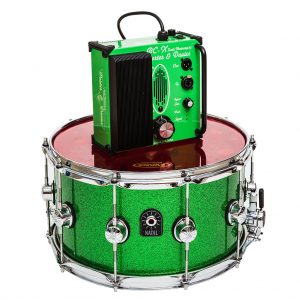
The Porter & Davies BC-X is available in two models: A 115 volt version for North America and Japan, and a 240 volt version for most other countries. The 240 volt model comes with either a UK or EU plug.
The BC-X comes with the following:
- BC-X Engine (either USA 115 volts, GB 240 volts or EU 240 volts)
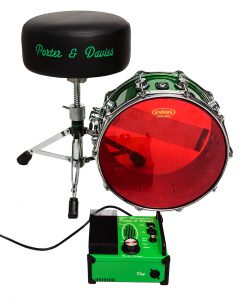
- Throne top (13” / 33cm round all vinyl only). Mounted inside the throne is a Porter & Davies TT1 Tactile Transducer, made exclusively for us by legendary British speaker builders, Precision Devices Ltd.
- Speakon NL4 connector cable.
You will also need the following, as they are NOT supplied with the BC-X.
- The throne base is NOT included, but our thrones will accommodate 7/8″ diameter throne bases as used by Gibraltar, Roc N Soc, Yamaha, DW, Tama, Pearl, Ludwig, Premier, Custom Percussion, and others.
- If you like to sit low, we recommend our own extra-low throne base.
- Bass drum microphone and connecting XLR cable.
- Mic stand or Kelly Shu internal bass drum mount (highly recommended). If you wish to connect some e-kits to the BC-X (via the line input) you will need a regular jack to jack cable.
Basic set-up:
Put the throne and engine in position.
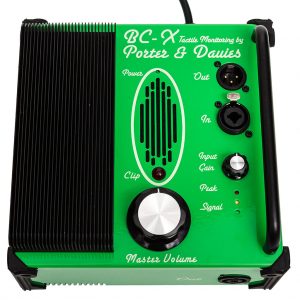
Plug in the bass drum mic XLR lead or a feed from the monitor board/desk to the dual purpose input socket. Select Line Input mode by using a 1/4” jack lead or convert an XLR cable with an adaptor (not provided), then plug in the throne via the supplied Speakon NL4 connector lead, and the power lead. Please see the section below for detailed instructions on using the Line input.
Turn the large ‘Master Level’ knob fully of (anti-clockwise). Switch the power on.
Play the bass drum at your max power and adjust the ‘Input Gain’ knob until the green and yellow LEDs are showing a strong signal. Back off a little if the red ‘Peak’ lights up [at this stage you will feel nothing through the throne]. This sets the basic input level for your playing style, drum, and whatever microphone you are using. You may need to set this near maximum (depending on the mic, its sensitivity and position) and how hard you play.
Gradually turn the Master Volume to your desired setting.
Avoid setting of the larger red ‘Clip’ warning light as this means you are overdriving the unit.
Instructions:
There are two ways to connect the bass drum microphone to the BC-X system:
- Directly via the ‘Mic’ XLR input.
- Via the ‘Line’ jack input from a mixing desk / board, either with a 1/4” jack cable or with an XLR cable using a 1/4” jack converter cable into the dual purpose input socket.
‘Mic’ input:
This is the most simple and efective method. The BC-X Engine is equipped with an internal hardwired passive microphone signal splitter, which means that the signal from the microphone is unafected by the controls on the Engine. The signal will go through to the PA perfectly even if the Engine is unplugged. The sound techs do their thing, and the drummer controls his/her precise desired setting. We recommend that sound techs are instructed to use the ‘Mic’ Output as if it were the actual microphone XLR socket.
The BC-X is equally happy with both dynamic and condenser microphones.
To use a condenser rather than a dynamic mic, you will need to be connected to a desk/board which can feed it the required 48v phantom power.
‘Line’ input:
The ‘Line’ 1/4” jack input has a number of applications:
- It will also take a feed from a monitor desk/board where you can then apply EQ and gating if required.
- The Line input will also allow other signals to be routed through the BC-X (bass guitar, snare, toms for instance).
- It will allow the connection of electronic drum kits to the BC-X system. The BC-X Line socket accepts both balanced and unbalanced inputs.
Tips & Suggestions:
A very important point is that posture has a great deal of infuence on how the BC-X performs. You will get so much more power from the system with a good posture than from a curved sitting position.
The BC-X reproduces the sound of your drum with remarkable accuracy.
A badly tuned drum with old heads will not give you the same impact and tone as a well tuned drum. You get back what you put in.
Bass drum size is irrelevant. You will get similar levels of power from an 18 x 14 or a 24 x 18 if they are set up well.
Microphone positioning will afect the response of the BC-X in the same way as it alters the out-front or studio sound. A great all-round position (for maximum power and impact) is approximately 4 inches (10 cms) away from the beater impact point, and at a slight angle. Having the mic deep inside the drum will also greatly reduce external sounds (such as a loud bass guitar) from entering the BC-X.
If you have a very loud stage, some gating of the bass drum mic will remove the stage sound from being picked up by the BC-X.
A dampened drum will give you a very direct thump, whereas if your bass drum is very boomy, this length of note will be transferred back to you via the throne. TIP: If you like a long open sound but want a more direct ‘kick’ sensation in your throne, try placing the mic (or a separate one) outside on the batter side of the bass drum nice and close to where the beater strikes.
If you play with both ‘beater on’ and ‘beater of’, the BC-X will faithfully reproduce the diferent efects of these techniques (depending on bass drum set up, of course).
Try the BC-X in the recording studio: It is an astounding recording aid. You may wish to use a separate mic, especially if the recording mic is way outside the drum.
Driving the BC-X from the monitor desk/board:
- Assign a separate output to send a mix to the engine, in the same way as you would for a wedge/monitor sub (this will most likely be an XLR going into a female XLR to male 1/4” jack converter cable)
- Set the master output of this aux at 0dB (most masters are infnity to +6dB or more). This output needs to be nice and hot, because the BC-X Engine has its own volume control, unlike a wedge or sub power amp, which is always set at full volume.
- Mix in appropriate levels of drums, bass, keyboards, or whatever you want to monitor through the BC-X system.
Output EQ:
- Most monitor desk/board outputs have assignable EQs. You can enhance the effect of the BC-X signal with a little EQ.
- For the bass drum, we recommend setting the HP flter (or a tight shelving EQ) to around 40Hz (depending on personal preference), as you don’t get any focussed efect in the seat from frequencies below this, but they will draw a lot of power (which will make the ‘clip’ LED light earlier)
- For more thump, the area around 80Hz is very potent, and the frequencies up to around 160Hz are all felt physically.
- Set a very narrow band (High ‘Q’) 6db peak and sweep the frequency between 70-100Hz until you find your personal chest cavity resonance (the bass drum ‘hit’ sensation). You will now find you can reduce the master volume and retain the best effect from the unit.
- These settings also work wonders with any other signal fed into the BC-X, i.e. toms, snare, bass guitar etc.
Please remember that at Porter & Davies we are always here to help, so PLEASE contact us if you have any questions.
Download PDF

 The BC-X features identical build quality to our flagship BC2, BC2rm and Gigster systems. It has around 75-80% of the power and performance of its bigger brothers, but with features simplified even further than the Gigster to help achieve a substantially lower retail price. The BC-X is a very tidy package with much reduced size, and a dedicated 13” / 33 cms all-vinyl round throne top. The BC-X engine measures only 8” x 7.5” x 4” (20 cms x 19 cms x 10 cms).
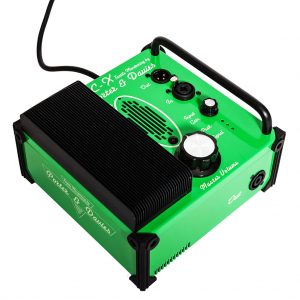 The BC-X has the same build quality as the BC2 and Gigster and many of the same components. Here are the differences:
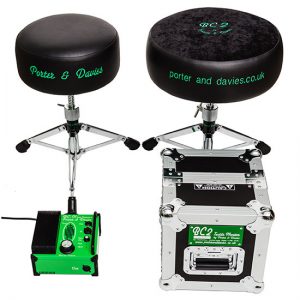 The BC-X is an amplified Tactile Generator Monitor System which transmits the full bass drum signal and sound (or any other drum) physically up through the drum stool. This signal is registered mainly through bone conduction (see the Theory page), and the result is far more sophisticated than a simple ‘thump’. All of the tone and intricacies of the bass drum sound and impact are felt and heard internally.
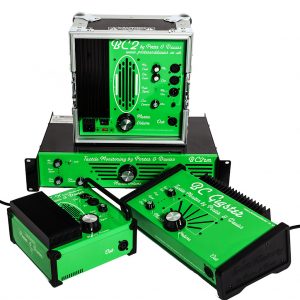 The BC-X unit is even more compact than the already tiny Gigster, but has the same efficient use of power: It needs under 130W to drive is as opposed to around 1200W required by a well known competitor.
 Cheaper tour/stage spec: No subs required for the drummer.
 Dimensions: