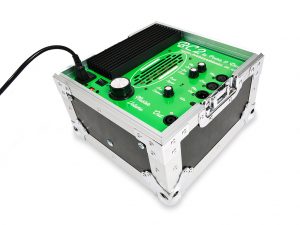
The BC2 and BC2rm come with the following:
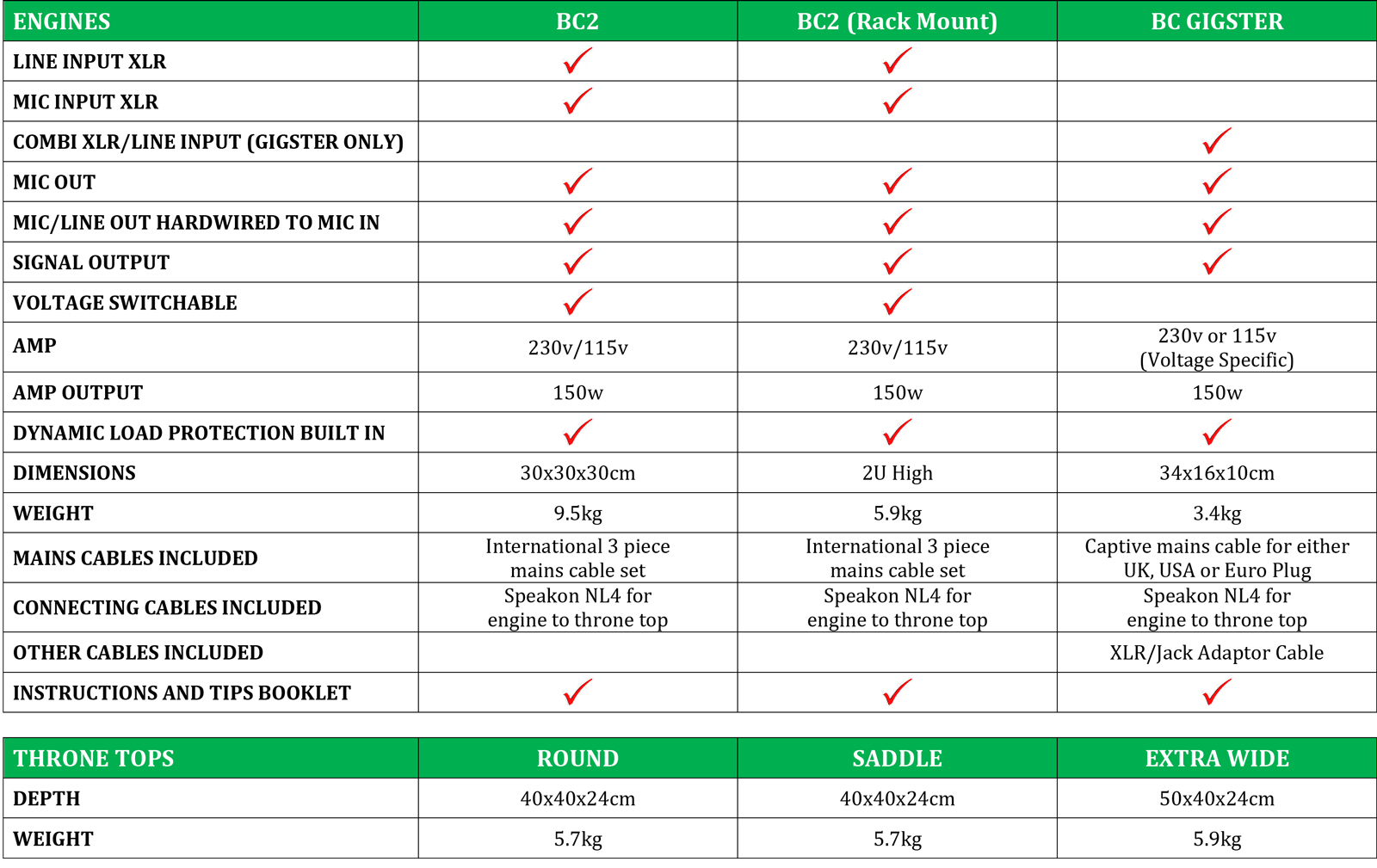
- BC2 or BC2rm Engine.
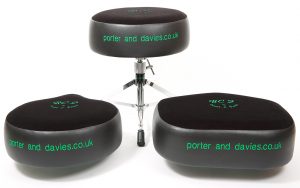
- Throne top (choice of three styles). Integrally mounted inside the throne is our very own Precision Devices transducer.
- Speakon NL4 connector cable.
- 3 x power cables: USA, GB, EU.
You will also need the following, as they are NOT supplied with the BC2:
- The throne base is NOT included, but our thrones will accommodate 7/8″ diameter throne bases as used by Gibraltar, Roc N Soc, Yamaha, DW, Tama, Pearl, Ludwig, Premier, Custom Percussion, and others. Custom sizes and pneumatic (air lift) mounting brackets are available on request, as are backrests on all models.
- If you like to sit low, we recommend our own extra-low throne base.
- Bass drum microphone and connecting XLR cable.
- Mic stand or Kelly Shu internal bass drum mount (highly recommended).
- XLR lead to link the mic to the BC2 ‘Engine’.
Basic set-up
Put the throne in position and open the BC2 Engine flightcase. You can use the lid as a support for the Engine section for more height. It has specially designed recessed corner pieces for stability.
Plug in the bass drum mic XLR lead to ‘Mic’, or a feed from the monitor board/desk to ‘Line’, plug in the throne (via the supplied Speakon NL4 connector lead), and the power lead. Please see the section below for detailed instructions on using the Line input.
Turn the large ‘Master Level’ knob fully off (anti-clockwise) and start off the ‘Low Contour’ knob at about 12 – 1 o’clock. Switch the power on.
Play the bass drum at your max power and adjust the ‘Mic Level’ knob until the red ‘Peak’ lights up [at this stage you will feel nothing through the throne]. This sets the basic level for your playing style, drum, and whatever microphone you are using.
Next, pull the Mic Level back a fraction to avoid overdriving the unit. Some bass drum mics will run hotter than others.
Gradually turn the Master Volume to your desired setting.
Adjust the Low Contour to your preference. Generally speaking, unported bass drums require far less Low Contour than those that are dampened and ported. Too much Low Contour may trigger the VMT (see below).
Instructions
The BC2 is equipped with a voltage selector switch which will allow the unit to be used in countries with either 230 and 115 Volts (such as USA and Japan). Please select CORRECTLY! There are two ways to connect the bass drum microphone to the BC2 system: Either directly via the ‘Mic’ XLR input or via the ‘Line’ XLR input.
‘Mic’ input:
This is the most simple and effective method. The BC2 Engine is equipped with an internal hard-wired passive microphone signal splitter, which means that the signal from the microphone is unaffected by the controls on the Engine. The signal will go through to the PA perfectly even if the Engine is unplugged. The sound techs do their thing, and the drummer controls his/her precise desired setting. We recommend that sound techs are instructed to us the ‘Mic’ Output as if it were the actual microphone XLR socket.
The BC2 is equally happy with both dynamic and condenser microphones. Should you wish to use a microphone requiring phantom power but are not connected to a desk/board supplying the phantom power, simply activate the 48V power switch on the front panel of the Engine.
‘Line’ input:
The ‘Line’ XLR input has a number of applications:
- It will also take a feed from a monitor desk /board where you can then apply EQ and gating if required.
- The Line input will also allow other signals to be routed through the BC2 (bass guitar, snare, toms for instance).
- It will allow the connection of electronic drum kits to the BC2 system. You can also mix the Mic and Line inputs simultaneously.
The BC2 Line socket accepts both balanced and unbalanced inputs.
Tips & Suggestions
The BC2 reproduces the sound of your drum with remarkable accuracy.
A badly tuned drum with old heads will not give you the same impact and tone as a well tuned drum. You get back what you put in.
Bass drum size is irrelevant. You will get similar levels of power from an 18 x 14 or a 24 x 18 if they are set up well.
Microphone positioning will affect the response of the BC2 in the same way as it alters the out front or studio sound. A great all-round position (for maximum power and impact) is approximately 4 inches (10 cms) away from the beater impact point, and at a slight angle. Having the mic deep inside the drum will also greatly reduce external sounds (such as a loud bass guitar) from entering the BC2.
If you have a very loud stage, some gating of the bass drum mic will remove the stage sound from being picked up by the BC2.
A dampened drum will give you a very direct thump, whereas if your bass drum is very boomy, this length of note will be transferred back to you via the throne. TIP: If you like a long open sound but want a more direct “kick” sensation in your throne, try placing the mic (or a separate one) outside on the batter side of the bass drum nice and close to where the beater strikes. If you play with both ‘beater on’ and ‘beater off’, the BC2 will faithfully reproduce the different effects of these techniques (depending on bass drum set up, of course).
The white bulbs (VMT):
If you turn the BC2 up high and play with sustained speed and power (double pedal onslaught etc), you will likely engage the BC2’s VMT (Vacuum Micro Tube) protection device. This is when the white bulbs unit under the grid lights up. This device protects the transducer inside the throne by preventing excessive amounts of signal being sent to it. The more the protection device lights up, the more excess power is diverted away from the transducer and dumped to the bulbs. This enables the P&D system to look after itself and come to absolutely no harm.
For optimum and consistent power we recommend setting the BC2 to a level where the lights do not come on regularly. Even at this level you will probably feel a bit beaten up anyway! If you consistently light up the VMT, please see the ‘Output EQ’ section below.
Try the BC2 in the recording studio: It is an astounding recording aid. You may wish to use a separate mic, especially if the recording mic is way outside the drum.
Driving the BC2 from the monitor desk/board
- Assign a separate output to send a mix to the engine, in the same way as you would for a wedge/monitor sub (this will be an XLR for the BC2).
- Set the master output of this aux at 0dB (most masters are infinity to +6dB or more). This output needs to be nice and hot, because the BC2 Engine has its own volume control, unlike a wedge or sub power amp, which is always set at full volume.
- Mix in appropriate levels of drums, bass, keyboards, or whatever you want to monitor through the BC2 system.
Output EQ:
- Most monitor desk/board outputs have assignable EQs. You can enhance the effect of the BC2 signal with a little EQ.
- For the bass drum, we recommend setting the HP filter (or a tight shelving EQ) to around 40Hz (depending on personal preference), as you don’t get any focussed effect in the seat from frequencies below this, but they will draw a lot of power (which can set off the VMT).
- For more thump, the area around 80Hz is very potent, and the frequencies up to around 160Hz are all felt physically.
- Set a very narrow band (High ‘Q’) 6db peak and sweep the frequency between 70-100Hz until you find your personal chest cavity resonance (the bass drum ‘hit’ sensation). You will now find you can reduce the master volume and retain the best effect from the unit.
- These settings also work wonders with any other signal fed into the BC2, ie toms, snare, bass guitar etc.
Please remember that at Porter & Davies we are always here to help, so PLEASE get in contact if you have any questions.
Download PDF

 Born out of a combination of necessity and ingenuity, the BC2 by Porter & Davies is a small, highly portable and tough solution to an age-old problem: We all know the feeling of the bottom end thump when we see a band from out front. Who usually feels that the least in the whole room? The drummer. The answer is a device that you are in control of, that delivers the weight and power and the sound of the bass drum without the external volume.
 If you’re using in-ear monitoring, you’ll be able feel the bass drum like never before. If you’re not using in-ears, this system so accurately connects you to your bass drum that it will improve your confidence, groove, playing and whole stage experience. It is an absolute revelation in the recording studio!
 The BC2 is an amplified Tactile Generator Monitor System which turns the bass drum signal (and other signals if required) into ‘tactile sound’ up through the drum stool. You feel it and hear it, but no one else does. This works mainly through bone conduction (see the Theory page). The result is far more sophisticated than a simple ‘thump’. All of the tone and intricacies of the bass drum sound and impact are felt and heard internally.
 The three handmade comfortable Throne top designs are extremely sturdy and elegantly constructed, and are adorned with a silk ‘P&D’ logo, and are available in seven colours. They will accommodate 7/8” diameter throne bases as used by DW, Gibraltar, Roc N Soc, Yamaha, Tama, Ludwig, Premier, Custom Percussion, and others. Custom sizes and pneumatic (air lift) mounting brackets are available on request.
 The whole system takes well under 2 mins to rig up. Open the flightcase, plug in the bass drum mic directly (or line from the monitor desk/board), connect the power lead, connect the throne to the box, switch on. That’s it.
 BC2 by Porter & Davies ‘Engine’:
 Saddle Throne Top: