Place on a flat, secure surface. Carpet is fine.
Quick set-up
- Plug in NL4 and connect to Engine
- Always make sure the Master Volume is at zero when you turn the Engine on
- Adjust input gain for green/yellow LED good, never red
- Gently increase Master Volume. Tweak Low Contour to taste, if necessary. Start at 12 o’clock.
Connecting
Line in from Monitor desk is the best option.
Alternatively: Line in from any ‘line’ or ‘DI’ output on the back of the bass or guitar amp.
Instrument direct to Engine and link out to amp is not recommended.
Engine Instructions
All three P&D Engines will drive the KT Platform. They all have the same build quality, power and performance, just some different features. Please see the website for full details.
The BC2 and BC2rm are equipped with a voltage selector switch which will allow the units to be used in countries with either 230 and 115 Volts (such as USA and Japan). Please select CORRECTLY! The Gigster however comes as either a 230 or 115 volt model.
To connect to all three Engine types
This is done via the ‘Line’ XLR input (or via 1/4 inch Jack for the Gigster).
The ‘Line’ input is very versatile. First of all, it will allow the connection of a regular amplifier (bass, guitar, etc) to the Engine. It will also take a feed from a monitor desk/board for those who prefer to route the signal(s) in this way.
The Line input will also allow other signals to be routed through the KT Platform (eg bass drum). For some suggestions, please see the website. The Line input also allows for extra EQ treatment from the monitor desk/board if required.
The Line sockets in all three Engine types accept both balanced and unbalanced inputs.
Tips & Suggestions
If you turn the KT up very high and play with sustained intensity and power, you will likely engage the Engine’s VMT (Vacuum Micro Tube) protection device. This is when the white bulbs unit under the grid lights up. This device protects the transducer inside the Platform by preventing excessive amounts of signal being sent to it. The more the protection device lights up, the more excess power is diverted away from the transducer and dumped to the bulbs.
Please be aware that when this happens, the KT Platform will feel weaker, and turning it up will only exacerbate the matter.
For optimum and consistent power we recommend setting the Engine to a level where the lights do not come on regularly. Even at this level you will probably feel a bit overpowered anyway.
The key is to go for a balanced musical level… This is when you will get the most out of the system. Also, the more you use it the more your brain will become attuned to it, and the volume will decrease.
We recommend also trying other sources as well as your own being fed into the KT. Please see Applications on the website for some ideas.
If you do consistently light up the VMT, try easing off a little Low Contour and compensating with the Master Volume. For further solutions, please see the ‘Output EQ’ section below.
Please note:
Be particularly aware of live mic placement; there can still be physical feedback between mic and platform. Separate as far as is practical.
Driving the BC2/Gigster from the monitor desk/board
- Assign a separate output to send a mix to the engine, in the same way as you would for a wedge/monitor sub (this will be an XLR for the BC2)
- Set the master output of this aux at 0dB (most masters are infinity to +6dB or more). This output needs to be nice and hot, because the BC2 Engine has its own volume control, unlike a wedge or sub power amp, which is always set at full volume
- Mix in appropriate levels of drums, bass, keyboards, or whatever you want to monitor through the BC2 system.
Output EQ
- Most monitor desk outputs have assignable EQs. You can enhance the effect of the BC2 signal with a little EQ
- For the bass drum, we recommend setting the HP filter (or a tight shelving EQ) to around 40Hz (depending on personal preference), as you don’t get any focussed effect in the seat from frequencies below this, but they will draw a lot of power (which can set off the VMT)
- For more thump, the area around 80Hz is very potent, and the frequencies up to around 160Hz are all felt physically
- Set a very narrow band (High ‘Q’) 6db peask and sweep the frequency between 70-100Hz until you find your personal chest cavity resonance (the bass drum ‘hit’ sensation). You will now find you can reduce the master volume and retain the best effect from the unit
- These settings also work wonders with any other signal fed into the BC2, ie toms, snare, bass guitar etc.
Download PDF

 Do you want to sound and feel like you have a huge amp stack behind you, but no one else needs to hear it? At Porter & Davies we are proud to introduce you to our family of KT Platforms, which use the transmission of sound by Kinetic Transfer (KT) to enable musicians to feel and hear their playing internally, instead of just relying on conventional audio methods.
 The KT Platform is perfect for bass players, DJs, guitarists, keyboard players and percussionists: It gives a full and faithful transfer of the sound and the weight of the sound through bone conduction. There is no time lag. It’s not just a low-end rumble: All notes are faithfully transmitted, including harmonics and all dynamics. It is highly portable and quick to set up and dial in.
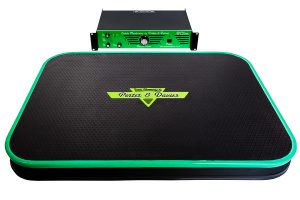 Please meet the KT Platform family:
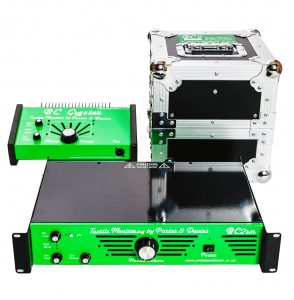 The Engines come in three styles:
  The KT Concert Platform is the bigger brother of the TT6 Equipped KT Platform described above. It too is fitted with the TT6 1,000w super-transducer, but is exactly twice the size and is therefore ideal for those who like to move around on stage more.
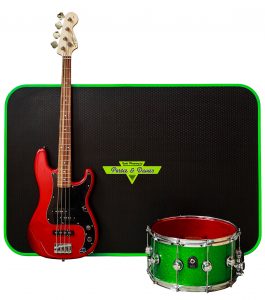 Here are a few examples of how the KT Platform can be used:
 Singers using in-ears: